
Choruses repeat, and hit songs repeat them a lot. In 2015, a study in the Journal of Consumer Psychology looked at every Billboard Hot 100 No. 1 from 1958 to 2012. It found that each extra chorus repetition raised a song's odds of reaching No. 1 by 14.5% (Pacific Standard, 2015). Good for the songwriter. Tedious for whoever has to chart it.
Every one of those repeats needs the same chords in the same places. Placing them by hand three or four times is slow. Worse, it's how small errors creep in. This tutorial shows how autofill handles the repeats for you, exactly what it treats as a "repeat," and when you'd want it off.
Key Takeaways
- Autofill copies a chord to every identical lyric line below the one you're editing, at the same position in the line.
- Matching is exact and line-by-line: capitals, punctuation, and spacing all count.
- It never overwrites a chord you've already placed, and one Ctrl+Z undoes the chord and all its copies.
- Chart the first occurrence completely, then hand-edit any repeat that changes.
What Does Autofill Do on a Chord Sheet?
Autofill copies a chord you place onto every later lyric line that's identical to the one you placed it on. The copy lands at the same character position, so it sits over the same syllable. In Chordastic, the feature is called Autofill Repeating Lyrics and it's on by default, in both the free and full versions.
So if line 3 of your first chorus reads "And I will rise again" and that exact line appears in choruses two and three, one click on the first one charts all three. You place the chords once. The repeats fill in as you go, line by line, while you work through the first chorus.
That's the whole idea: chart a section once, and every exact repeat follows it automatically. It's the digital version of writing "Chorus" and pointing back, except the chords really are printed on every repeat, so nobody has to flip pages to find them.
How Do You Autofill Chords in Chordastic?
Autofill isn't a separate command. It runs every time you place a chord, as long as the setting is on. Here's the workflow, step by step:
- Add the full lyrics first. Paste them with Lyrics → Paste from Clipboard (
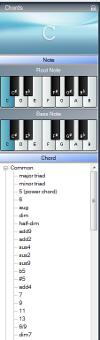
Ctrl+Shift+V) or load a.txtfile with Lyrics → Open from file…. Write out every chorus in full; autofill can only copy to lines that exist. - Pick the chord in the chord panel: root note, an optional bass note for slash chords, and the chord symbol.
- Left-click above the syllable where the change happens, on the first occurrence of the line. The chord appears there, and on every identical line further down.
- Work through the first chorus or verse line by line. Each chord you place gets copied to the matching lines below it.
- Scroll down and check the repeats. If a repeat changes, fix that one by hand (more on that below).
Two shortcuts autofill too. Right-clicking an empty spot lists every chord already used in the song, and picking one from that list places and autofills it. Right-click-dragging an existing chord to a new spot and choosing Copy autofills the copy as well. Move doesn't, as you'll see below.
Why start from the first occurrence? Autofill only looks down the song, never up. Place a chord on the second chorus and the third chorus gets it, but the first doesn't. Start at the top and you never have to think about it.
What Counts as a "Matching" Line?
A line matches only if its text is exactly the same as the line you placed the chord on, character for character. Capital letters, punctuation, and spaces all count, including a stray space at the end of the line. Matching also works one line at a time, not one section at a time.
That last point is easy to miss. Autofill doesn't know what a "chorus" is. It compares individual lines. So a line that appears in both a verse and a chorus gets the chord in both places. And a chorus whose second line was edited still gets autofilled on its other, unchanged lines.
Exact matching is the right trade-off here. A "fuzzy" match would catch more repeats, but it would also copy chords onto lines that only look the same. Those are often the lines where the songwriter changed something on purpose. The diagram below shows how a few common variations of one line are treated.
The practical tip: if a chorus should have been autofilled but wasn't, compare the lines closely. The usual culprit is a comma or a capital letter left over from wherever you copied the lyrics.
What Won't Autofill Do?
Autofill only adds chords. It never overwrites a chord that's already on a matching line, and it doesn't follow later moves or deletions. That's by design. Once the copies are placed, each one is an independent chord you can edit without affecting the others.
In practice, that means:
- It won't overwrite your edits. If you've already placed a different chord at that spot on a repeat, autofill leaves it alone.
- Moving a chord moves only that chord. Right-click-drag with Move doesn't drag the copies along.
- Deleting a chord deletes only that chord. The copies further down stay put.
- One undo covers everything. The chord and all its autofilled copies are a single step, so
Ctrl+Z(or the toolbar's undo button) removes them together. - Imported songs aren't autofilled. Chords from a ChordPro import arrive exactly as they were in the file.
This gives you a clean workflow for songs whose last chorus changes, like a different chord on the final line or an extra tag. Chart the first chorus completely. Let autofill fill the repeats. Then go to the one repeat that differs and fix it by hand. Your edit sticks, because autofill never goes back and overwrites it.
When Should You Turn Autofill Off?
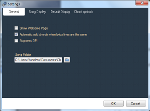
Turn autofill off when the same lyric line deliberately gets different chords in different places. A line that repeats inside a verse over new harmony is a common example, and so is a chorus that's reharmonized each time through. In Chordastic, open Settings, go to General, and untick Auto-add chords to matching lyrics.
For most songs, though, it's worth leaving on. Thanks to the "never overwrite" rule, it's usually quicker to let autofill fill the repeats and fix the odd exception than to switch it off and chart every repeat by hand. Want the chords you've already placed to stay but stop new copies? Just switch it off. Existing copies stay where they are.
How Is Autofill Different From ChordPro's Chorus Directive?
ChordPro, the open text format for chord sheets, handles repeats with a recall marker instead. Its {chorus} directive "indicates that the song chorus must be played here" (ChordPro, Directives: chorus). In other words, it points back at a chorus defined earlier in the file rather than writing it out again.
Both approaches are valid; they solve different problems. A recall marker keeps the file and the printed page short. Autofill keeps every repeat fully written out, with its own chords, so each one can be edited on its own.
Which is better for performing? That depends on the repeat. We cover the risk of leaning on repeat markers when a repeat isn't truly identical in our list of chord sheet formatting mistakes. And if page count is the problem, collapsing repeats is one of the tactics in our two-column chord sheet guide.
Frequently Asked Questions
Does autofill work on verses as well as choruses?
Yes. Autofill compares individual lines, not sections, so it works on any lyric line that repeats exactly further down the song: verse lines, chorus lines, tags, or a refrain inside a verse. It doesn't need the song to be labeled into sections at all.
Why didn't autofill copy a chord to my second chorus?
The line in the second chorus probably isn't an exact match. Check for a different capital letter, an extra comma, or a double space. Also check where you placed the chord: autofill only copies to lines below, so a chord placed on the second chorus won't reach the first.
Will autofill overwrite chords I've already placed?
No. Autofill only adds chords to empty positions on matching lines. If you've already placed a chord at that spot on a repeat, it stays as it is. That's what makes it safe to hand-edit one repeat and keep autofill on for the rest of the song.
Is autofill included in the free version of Chordastic?
Yes. Autofill Repeating Lyrics is included in both the free and the full version of Chordastic, along with ChordPro import and export, semitone transposition, and lyrics repeater symbols. See the pricing page for the full comparison.
Getting Started
Autofill is simple once you know its three rules. It matches exact lines, it only copies downward, and it never overwrites. Lay out the full lyrics, chart the first occurrence of each section, and let the repeats fill themselves in. Then fix the one or two repeats that are meant to differ.
Download Chordastic for free and try it on a song with a big repeated chorus. New to Chordastic? Start with the complete guide to creating chord sheets, or check the manual for every chord-placement option.
Sources
- Pacific Standard, Yeah, Yeah, Yeah: Repetitive Lyrics Boost Songs' Popularity (Tom Jacobs, 2015-01-12), reporting on Nunes, Ordanini & Valsesia, The Power of Repetition, Journal of Consumer Psychology 25(2), 2015; retrieved 2026-10-11, https://psmag.com/?p=30843
- Bocconi University IRIS repository, record for The Power of Repetition (2015), retrieved 2026-10-11, https://iris.unibocconi.it/handle/11565/3955321
- ChordPro, Directives: chorus, retrieved 2026-10-11, https://www.chordpro.org/beta/directives-chorus/